Replace Text Like Magic: 8 Awesome Tricks to Try

I started using Replace Text for the most boring reason possible — a typo I'd made about forty times in a draft. I fixed it, closed the tab, and didn't think about Replace Text again for weeks. Then a friend mentioned she'd used it to reformat her entire set of meeting notes, and something clicked. I started poking around, testing little experiments, and realized this thing had quietly become part of how I work with text. Here's what I've found it can do — some of it practical, some of it playful, all of it genuinely useful.
Want to jump straight in? Open Replace Text and start transforming your writing in seconds.
Instantly Fix Spelling Slip-Ups with Replace Text
We all have that one typo we make over and over. Mine used to be "teh" instead of "the." For a lot of people it's "becuz" or "gonna" sneaking into something that should sound more polished. Whatever your personal nemesis is, one find-and-replace pass wipes it from the entire document. "Their" and "there" mix-ups, "its" and "it's" confusion — same deal. It's not glamorous, but it's the kind of fix that makes everything you write look more put-together in seconds.
Trim the Fat from Your Sentences
I write long. Always have. When I go back through a draft, I spot phrases like "due to the fact that" sitting where "because" would do the job, or "a lot of" where "many" works fine. Using Replace Text to run a few targeted replacements — "very big" to "huge," "in order to" to "to" — tightens things up without me having to manually hunt down each bloated phrase. The first time I did this on a personal statement for a college application, it clawed back enough words to get me under the limit with room to spare. Now it's just part of my editing routine.
It was a very big surprise.
It was a huge surprise.
Rename Characters, Companies, or Anything with Replace Text
A coworker did NaNoWriMo last year and realized around chapter twelve that her protagonist's name just felt wrong. Fifty thousand words in, and she needed to change "Max" to "Buddy."
She was ready to set the manuscript on fire.
I showed her the Replace Text tool, she clicked once, and the whole thing updated. The look on her face was worth it.
This same trick works for updating a company name in a quarterly report, swapping a product code in a long spec document, or standardizing any term across a project where consistency matters. With Replace Text, sweeping changes like these take just one pass.
Wake Up Your Notes with Replace Text and Emoji
I spend a lot of time in my notes app — meeting summaries, random ideas, reminders I'll probably ignore. For the longest time, I'd flag important lines with plain asterisks, like *submit by Thursday*, and then gloss right over them later. Replace Text makes this visual overhaul stupidly simple. Swapping those asterisks for something visual — ⭐ or 🔥 or even bold tags — made my notes surprisingly easier to scan. It's a tiny change, but when you're staring at a wall of text on a Monday morning, having the critical stuff actually pop out matters.
Practice a Language Using Replace Text, One Word at a Time
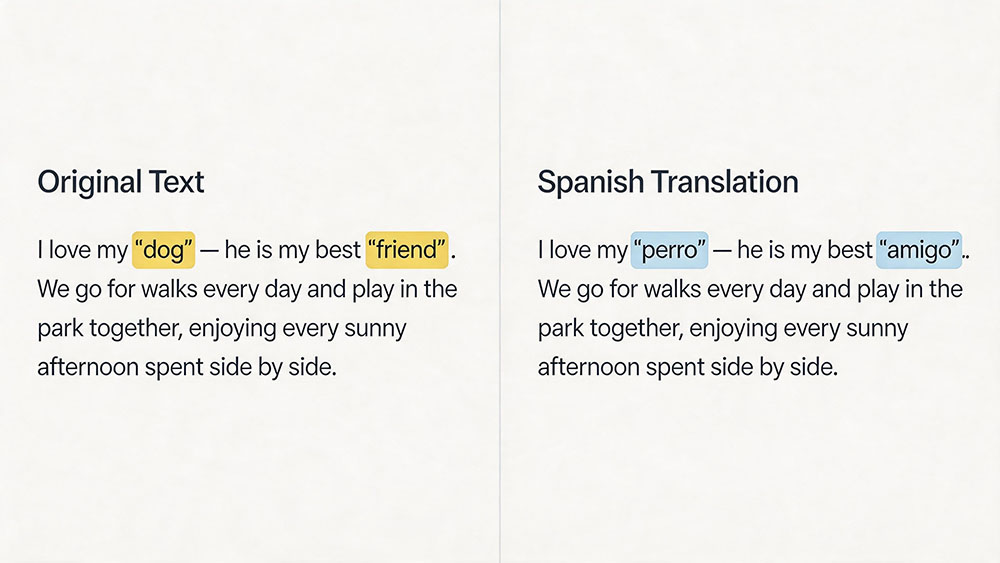
I've been picking up Spanish on Duolingo like half the people I know, and somewhere along the way I started using Replace Text to reinforce vocabulary.
Start with Nouns
I'd write a paragraph about my day in English, then replace the nouns with their Spanish equivalents — "dog" to "perro," "friend" to "amigo," "coffee" to "café." Reading sentences about my actual life with Spanish words woven in felt way more sticky than memorizing isolated vocab lists.
Build Up to Full Sentences
With Replace Text, you can do it in passes, too, gradually replacing more words until the whole paragraph is in your target language.
Cook Up a Secret Code Using Replace Text
This one's purely for fun. I ran a scavenger hunt at a friend's baby shower and encoded all the clues with Replace Text. "Look in the kitchen" became something like "Xelph in the morvane" after a few quick swaps. I printed a simple cipher key and handed copies to the guests. Watching a room full of adults huddle around decoding clues was honestly more entertaining than the actual party games.
Meet me at the park.
Meet me at the krelix.
How to Build Your Cipher
To create your own coded messages, start by choosing a few everyday words and inventing silly code words for them. Use Replace Text to swap all instances at once, then share the cipher key with your friends or party guests. It works for birthday treasure hunts, cryptic notes, or just messing with people who enjoy puzzles. All it takes is Replace Text and a little creativity.
Nuke Duplicate Grocery Items with Replace Text
I have a shared grocery list with my family, and without fail, certain items appear on it multiple times. Everyone adds "milk" independently, because no one checks if someone else already did. Running Replace Text to find and swap duplicates — swapping "milk" for "milk" — collapses those duplicates into a single entry. It's not what the tool was designed for, but it works, and it's spared me from buying three gallons of milk more than once.
Turn Any List into a Quiz with Replace Text
When my niece wants entertainment and I've got nothing prepared, I open Replace Text, grab a list of whatever topic she's into — animals, states, planets — and transform it into a trivia game.
From Static List to Interactive Game
Replace "cat" with "What animal says meow?" Swap "Texas" for "Which state is the Lone Star State?"
In under a minute, a static list becomes an interactive quiz. It's saved family dinners, car rides, and that one awkward stretch of a birthday party where the planned activities ran out.
Frequently Asked Questions
Can I undo a replacement if I mess up?
Absolutely. Replace Text has an undo button right there. Click it and your text goes back to how it was. You can experiment without worrying you'll break something.
Does it match whole words only?
Yes, with Replace Text, matching whole words is just an option you can toggle. Turn it on and replacing "cat" won't accidentally turn "catch" into "dogch" — only the standalone word gets swapped.
What about uppercase versus lowercase?
By default, Replace Text doesn't care about case. But you can switch on case-sensitive matching if you need to change "Cat" while leaving "cat" alone — completely under your control.
How fast can I replace text in a big document?
Replace Text works instantly in your browser, even on long documents. Just type what you want to find, what you want to replace it with, and hit apply — the whole document updates at once.
Is it really free?
Completely free. No sign-up, no account, and your text stays in your browser the whole time. We never see any of it.
Replace Text is one of those tools that starts out solving a small, boring problem and quietly becomes something you reach for all the time. Whether you're fixing a typo in an essay, learning Spanish vocabulary, or building a scavenger hunt for a baby shower, it just does the thing and gets out of your way. That's the magic of Replace Text.
Try Replace Text and see where it fits into your own workflow. You might end up using it more than you'd expect. 🪄